Organizing the structure aspect
The code in this and previous blog posts can also be found here, on Codeberg. Check out the repo at the commit marked “blog 05”.
This blog post will explain how I’ll organize MyFPL’s structure aspect. Specifically, I’ll explain the four central entities or meta-types of it. They’re called meta-types, because they’re “meta” to every in an AST, as well as to distinguish them from types defined by, and in, MyFPL itself.
Most – but not all – programs usually perform some kind of computation involving values. Such values typically are strings, numbers, booleans, enumerations, objects, arrays of those, and objects composing such values. These are the types of our language. So, we have the following relation between value and type.
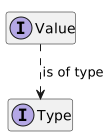
I’m (ab-)using UML’s class hierarchy diagram for this — thanks to PlantUML. The interfaces named Value and Type correspond to the terms “value”, and “type”, respectively. I’ll keep using this convention. Arrows with dotted lines purely express a functional relation between entities through the text on those lines.
The perfect tongue-in-cheek quote that embodies that, is:
“Immutability changes everything” — Pat Helland, CIDR 2025, through Jennek Geels
I’ll keep using the term “instance” for instances of actual (TypeScript/UML/etc.) classes.
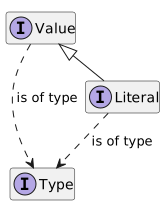
Next, we can think of how values of types are put into programs. The obviously most useful way to do this, is to run the program, at the same time providing it with input. But often, we also need to put literal values directly into the program’s code. Instead of relying on some external input providing those values, we use literals. As an example: the string "foo" is a literal for the value of the type string.
So, we now have the following relations between type, value, and literal:
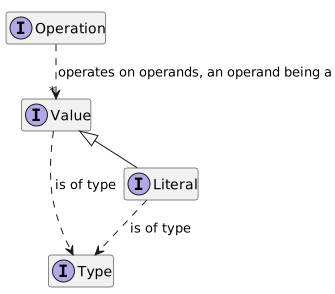
Then, we can start thinking about how computation is expressed. Computation is typically undertaken by performing operations: an operation takes in a number (including 0 in rare cases) of operands (which are values of types), and returns a result (which is again a value of some type).
So, we have the following relations between type, value, and operation:
We can even slightly improve on this diagram by noting that because an Operation returns a value of some type, we can consider it to be a Value in its own right:
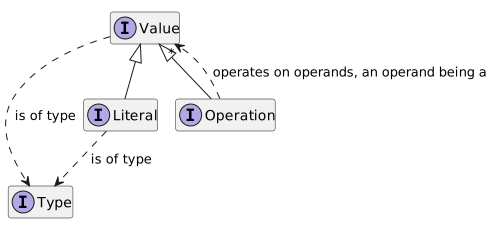
When adding constructs to the MyFPL language, we’d typically add a concept that either implements Value or its Operation specialization. When adding types to the MyFPL language, we’d typically add a concept that implements Type, and quite likely a concept that implements Literal.
Operation is already a Value, so what’s the worth of adding the Operation interface? This is a valid question.LionWeb
LionWeb is an initiative with the mission to create an ecosystem of interoperable components for building language-oriented modeling tools on the web. It currently consists of the following pieces:
- A specification for a JSON serialization format for models.
- A meta-metamodel – LionCore – to define LionWeb languages with: metamodels that models conform to.
- Specifications for protocols to manipulate models: bulk and delta.
One of the core principles of the LionWeb initiative is to back these specifications up with working – but possibly prototypal – implementations. One of these implementations is the TypeScript one, which is published as a collection of NPM packages whose names are prefixed with @lionweb/. We’ll be using this implementation for the implementation of MyFPL.
A LionWeb language – i.e., an instance of the Language meta-meta-type from LionCore – has some identifying metadata, and consist of any number of entities. (We call this a meta-meta-type, because it’s a type from the meta-metamodel.) The most important kinds of entities:
Classifier
These come in the flavors of concepts (and “sub”-flavors abstract or concrete) and interfaces. A classifier has any number of features, which are either properties (for boolean- or string-typed values), containments (for children), and references.
Enumeration
A fixed collection of enumeration literals.
For more in-depth information about LionCore, see Introduction to languages and its specification. (Full disclosure: I’m one of the core members of the LionWeb team.)
Mapping to LionWeb
I’d like to map this type hierarchy to a LionWeb language. More precisely, we want to construct a LionWeb language that corresponds to MyFPL’s structure or metamodel. The entities (meaning concepts, interfaces, enumerations, etc.) in that language will correspond to the last diagram above.
We construct the LionWeb language using a bit of TypeScript code. Editors exist for LionCore – LionWeb’s meta-language – but I’ll avoid setting up another dependency at this point.
Constructing a LionWeb language
We need a small amount of boilerplate to be able to construct a LionWeb language:
Listing 5. 1. Start of the packages/build/src/structure.ts file
import { LanguageFactory } from "@lionweb/core" (1)
import { concatenator, lastOf } from "@lionweb/ts-utils"

const factory = new LanguageFactory("MyFPL", "0", concatenator("-"), lastOf) (2)

export const myFplStructure = factory.language (3)- Import some members of the LionWeb NPM packages. This relies on having executed
npm add @lionweb/coreandnpm add @lionweb/ts-utilsbefore. - Instantiate a
LanguageFactorywhich is a helper class to build languages in a convenient way. This call also configures the name of the language ("MyFPL"), its stated version ("0"), and how the LionWeb IDs and keys of entities and their features are constructed from their names. - Expose the constructed LionWeb language after extracting it from the factory as
myFplStructure.
Next, we define the interfaces Type, Value, and Literal and Operation (that all extend Value):
Listing 5. 2. Constructing the Value, Type, Literal, and Operation classifiers (continuation of the packages/build/src/structure.ts file)
export const Value = factory.interface("Value") (1)
export const Type = factory.interface("Type")
export const Literal = factory.interface("Literal").extending(Value) (2)
export const Operation = factory.interface("Operation").extending(Value)- Construct interfaces (as instances of LionWeb’s
Interfacetype) namedValueandType. - Construct interfaces named
LiteralandOperation, and extending theValueinterface.
We also export all of these types, in case we need to reference them explicitly later on.
Generating from the LionWeb language
Having a LionWeb language is not enough: we also need to generate some code from it.
Listing 5. 3. Generation of code (and text) in the packages/build/src/build.ts file:
import { writeFileSync } from "fs" (1)
import { generateLanguage } from "@lionweb/class-core-generator" (2)
import { LionWebVersions } from "@lionweb/core"
import { generatePlantUmlForLanguage, languageAsText } from "@lionweb/utilities"

import { myFplStructure } from "./structure.js" (3)

generateLanguage(myFplStructure, "../my-fpl/src", LionWebVersions.v2023_1) (4)

writeFileSync("artifacts/structure.txt", languageAsText(myFplStructure)) (5)
writeFileSync("artifacts/structure.puml", generatePlantUmlForLanguage(myFplStructure))- Import the
writeFileSyncfrom Node.js’ standard library. This relies on having executednpm add --save-dev @types/nodebefore. - Import some (more) members of the LionWeb NPM packages. This relies on having executed
npm add @lionweb/class-core-generatorandnpm add @linoweb/utilitiesbefore. - Import MyFPL’s structure (constructed as a LionWeb language) from the
structure.tsfile. - Generate a file with an implementation of that language in the form of TypeScript types (classes, interfaces and their members/features, and enumerations). The generated file also contains a
MyFPLBaseclass that encodes a copy of the MyFPL’s structure LionWeb language, and provides a couple of other reflective capabilities. - Generate files under
packages/build/artifactscontaining a textual and graphical rendering of MyFPL’s structure LionWeb language.
We can run this code generation as follows (starting from the repo’s root):
cd packages/build
npm run generate (1)- Run the code generation as the NPM task
generatedefined inpackage.json.
This produces the TypeScript file packages/my-fpl/src/MyFPL.g.ts. (The .g infix in the .g.ts file extension indicates it’s a generated TypeScript file.) It also should have a class MyFPLBase, which defines a copy of the MyFPL LionWeb language, but in a different way than we did in packages/build/src/structure.ts file.
Right now, this generated file should have interfaces Value, Type, Literal, and Operation. It has no classes yet, but that’ll change: every concept we’ll define later on will result in a class in this file. Each instance can serve as a node in an AST.
The packages/build/artifacts/structure.txt file contains a “textualization” of the MyFPL LionWeb language, and should look as follows:
language MyFPL
    version: 0
    entities (↓name):

        interface Literal extends Value

        interface Operation extends Value

        interface Type

        interface Value
This is a convenient, human-readable rendering of the language in a textual format, rather than as JSON. This is a “one-way syntax” in the sense that no parser for it has been implemented. In particular, details like IDs and keys are missing so the information in this format is anyway incomplete.
Also have a look at the packages/build/artifacts/structure.puml, and verify it replicates the last PlantUML diagram above, though without the arrows that express a functional relation between entities.
Expanding the language
We’ll be adding plenty of concepts – i.e., instances of the Concept meta-meta-type from LionCore – that implements Value (either directly or indirectly) along the way that correspond to constructs of MyFPL. A construct of MyFPL will typically correspond to a concept in the MyFPL LionWeb language — sometimes more than one. Such a concept either implements Value directly, or indirectly by implementing Literal or Operation. Types are going to correspond to concepts that implement Type. (Where appropriate, we’ll add interfaces as well.) Data on MyFPL constructs or types end up as features of the corresponding concepts.
Any programming language has many constructs, which we can categorize in various “areas”, e.g.:
- Literals (which are constants):
0,"foo", etc. - Operations on values of various specific types
- Declarations and definitions of named values, including functions
- Flow control:
if <condition> then <consequence_1> else <consequence_2> - Function invocation (
f(…), AKA function call)
© 2026 Meinte Boersma (DSL Consultancy)