Visualizing computed types
The code in this and previous blog posts can also be found here, on Codeberg. Check out the repo at the commit marked “blog 12”.
In this blog post, we’re going to trigger type computation on our programs, and then visualize the computed types. We’ll re-use the mechanism that we implemented for the reductions of the values of a program:
- Compute the reduction of a values of a program
- Store that reduction inside an annotation node
- Have the projection extract that annotation node and the reduced value, and visualize it.
There’s a small difference: there’s precisely one reduction for every value in the values containment feature of a Program node, but we want to compute types for every typable node in the whole AST. Luckily, this difference can be dealt with using a simple expression involving built-in LionWeb functionality.
Defining an annotation to store computed types on
As before for the reduction of a value, we define a new ComputedType annotation that holds a computed type in its type containment feature. We add the following code to the packages/build/src/structure.ts file:
const ComputedType = factory.annotation("ComputedType").annotating(Typable)
factory.containment(ComputedType, "type").ofType(Type)
Listing 12. 1. Defining the ComputedType annotation (in the packages/build/src/structure.ts file)
After running the NPM generate task in the build package, we can work with the new ComputedType class.
We can visualize the new classifier (on the meta-level) with the following diagram:
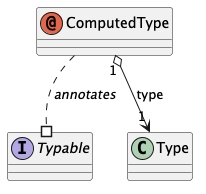
ComputedType annotation as part of MyFPL’s structureOn the node-level, this would look as follows:
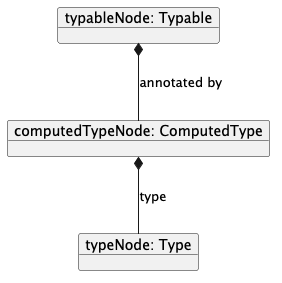
Typable node, the ComputedType node that annotates the former, and the computed type itselfAdding computed types to the AST
Just as we did for the reductions of values, we implement a function to add computed types to a whole program, in the packages/my-fpl/src/type-computer.ts:
import { nodeBaseReader } from "@lionweb/class-core" ❶
import { nodesExtractorUsing } from "@lionweb/core"
import { newId } from "./ids.js"
import { BinaryOperation, BooleanLiteral, BooleanType, ComputedType, Program, Typable, Type } from "./MyFPL.g.js"
import { isTypable } from "./reflection.g.js"

export const addTypesTo = (program: Program) => { ❷
    for (const node of nodesExtractorUsing(nodeBaseReader)(program)) { ❸
        if (isTypable(node)) { ❹
            const computedTypeAnno = ComputedType.create(newId()) ❺
            computedTypeAnno.type = typeOf(node) ❻
            node.addAnnotation(computedTypeAnno) ❼
        }
    }
}
Listing 12. 2. Adding computed types to all typable AST nodes (in the packages/my-fpl/type-computer.ts file)
- Import various new things from the corresponding LionWeb dependencies, or files in the
my-fplpackage. On line 4, the typesBooleanType,ComputedType, andProgramare added. - Define a
addTypesTofunction that takes a program, which is the root node (of conceptProgram) of the entire AST. - Loop over all nodes of the given program. The expression
nodesExtractorUsing(nodeBaseReader)produces a function that takes an AST node, and returns all nodes (including annotation instances) that are descendants of the given AST node, or that AST node itself. So, the expressionnodesExtractorUsing(nodeBaseReader)(program)produces all nodes the given program. - Only try to compute types for typable nodes, i.e. instances of the
Typableinterface, detected using theisTypablefunction. - Instantiate a
ComputedTypeannotation node with a randomly-generated ID. - Compute the type of
node, and assign that type to thetypefeature of the annotation node. - Add the annotation node to
node.
Next, we have to call this function, from the file packages/my-fpl/src/example.ts:
import { addComputedTypesTo } from "./type-computer.js"

addReductionsTo(myProgram) ❶
addComputedTypesTo(myProgram)
Listing 12. 3. Triggering adding computed types to all typable AST nodes (in the packages/my-fpl/example.ts file)
- This is a pre-existing line of code — and it’s the only one in this listing. Having that line there, ensures that the reductions of the values of the program are computed and added to the program’s AST before we trigger type computation. Because the
addComputedTypesTofunction loops over all nodes including all annotation instances, this means that we also compute types for all typable nodes in the reductions of the values of the program.
Visualizing the computed types
Now, we want to visualize the computed types on the projected AST. This is ultimately a UI/UX matter. There’s a myriad ways we could do this, depending on the amount of code we feel like spending on HTML, CSS, and additional JavaScript. Personally, I don’t feel like spending any of that, at the moment, so I chose to simply use HTML’s good ol’ title attribute to render information on the visualization of typable nodes as a poor man’s tooltip-of-sorts. But, before we can put in those title attributes, we need to come up with what text to display.
import { ..., BooleanType, ... } from "./MyFPL.g.js" ❶

export const typeOn = (node: Typable) => ❷
    node.annotations.find((anno) =>
        anno instanceof ComputedType)?.type

export const typeAsText = (type: Type): string => { ❸
    if (type instanceof BooleanType) { ❹
        return "boolean"
    }
    throw new Error(concept not handled by typeAsText: ${type.classifier.name}) ❺
}
Listing 12. 4. Rendering computed types as text (in the packages/my-fpl/example.ts file)
- Also import the
BooleanTypetype, for the implementation of thetypeAsTextfunction. - Define a
typeOnfunction that extracts the firstComputedTypeannotation node from the given typable node, and returns the value of thetypecontainment feature. Although we try to ensure that all typable nodes contain aComputedTypeannotation node, we also handle the situation if that’s not the case. In that case, this function returnsundefined. - Define a
typeAsTextthat renders aTypenode as text. - Handle a boolean type — currently, the only concrete
Typeconcept. - Throw an
Errorwith a meaningful message if we forget to handle a concreteTypeconcept.
Now, we can use these functions in the Projection function.
import { ..., Typable } from "./MyFPL.g.js" ❶
import { typeAsText, typeOn } from "./type-computer.js"

const titleTextFor = (node: Typable) => { ❷
    const maybeType = typeOn(node) ❸
    return maybeType === undefined ? (no type for node with ID=${node.id}) : typeAsText(maybeType) ❹
}
Listing 12. 5. Rendering computed types as text suitable for the title attribute (in the packages/my-fpl/projection.tsx file)
- Also import the
Typabletype. - Define a
titleTextForfunction that returns a suitable text for thetitleattribute of the HTML element returned by theProjectionfor a given node. - Try to extract the computed type from the given
node—maybeTypewill beundefinedin case there isn’t one. - Return a textual rendering of the computed type, or some “debug-like” information in case no computed type was extracted.
Finally, we want to use the titleTextFor function in the Projection function. Recall that this function is essentially consists of blocks of the following form:
if (node instanceof <name of concrete concept>) {
    return <<tag name> className="..." [other attributes]> ❶
        ...
    </<tag name>>
}
Listing 12. 6. Rendering a computed type as a title attribute (in the packages/my-fpl/projection.tsx file)
- The <tag name> is typically either “
span” or “div”.
For every concrete, typable concept we handle in the Projection function, we simply add the following code to the [other attributes] section: title={titleTextFor(node)}. Currently, the only concrete, typable concepts in MyFPL’s structure are BooleanLiteral, and BinaryOperation. I’ll leave the actual code change as an exercise for the reader — and you can always compare with my code implementation on Codeberg.
After doing so, we can build the code, run the transpiled dist/example.js, and look at the example.html in the browser — (both of these files relative from the packages/my-fpl/ directory). This allows us to see the computed types of typable AST nodes by hovering over its visualized projection.
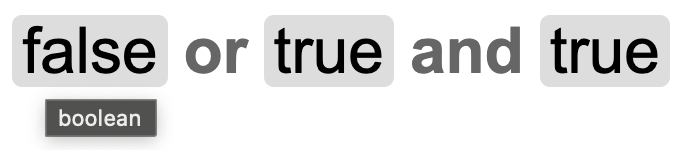
false boolean literal by (mouse-)hovering over it, and look at the text that appears© 2026 Meinte Boersma (DSL Consultancy)