> ## Content Index
> Fetch the complete content index at: https://dsl-consultancy.ghost.io/llms.txt
> Use this file to discover other available public pages before exploring further.
# Syntax
- URL: https://dsl-consultancy.ghost.io/syntax/
- Published: 2026-09-25T07:05:27.000Z
- Updated: 2026-09-25T12:26:18.000Z
- Author: Meinte Boersma
💡
This is post 08 in my blog series on MyFPL — see [the index/table of contents](https://codeberg.org/dslmeinte/my-fpl/src/branch/main/blogs/index.adoc?ref=dsl-consultancy.ghost.io).
The code in this and previous blog posts can also be found [here, on Codeberg](https://codeberg.org/dslmeinte/my-fpl?ref=dsl-consultancy.ghost.io). Check out the repo at the commit marked “blog 08”.
So far, I only talked about the *abstract syntax* of MyFPL. Now, it’s time to address a large, pink-ish elephant in the room: **concrete syntax**.
## Projectional editing
You might’ve noticed (in blog posts [01](https://dsl-consultancy.ghost.io/whats-myfpl/) and [02](https://dsl-consultancy.ghost.io/why-create-my-own-fpl/)) that I have a certain fondness for **projectional editing**. (Disclaimer: I wrote a [book](https://www.manning.com/books/building-user-friendly-dsls?ref=dsl-consultancy.ghost.io) about it `;)`) A **projection** for a language is a function that takes any AST in that language, and renders that in a human-readable form: the language’s *notation*. Typically, a projection takes any *node* in an AST, and calls itself recursively for (all of) its children. By passing the AST’s root node to the projection, you get a rendering of the whole AST.
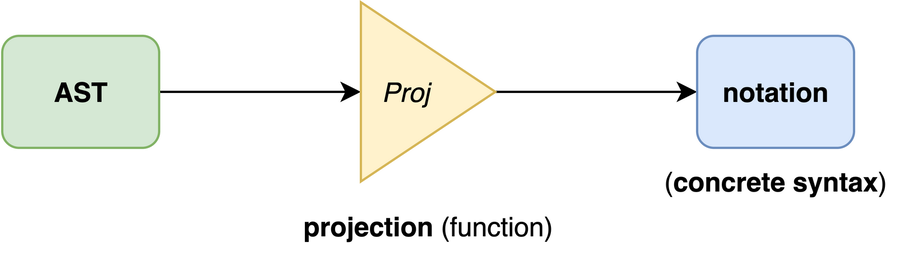
Projection an AST
There’s considerable freedom in that human-readable rendering: it *could* be textual, but it can also be something thoroughly graphical, or something in between.
In [blog post 03](https://dsl-consultancy.ghost.io/aspect-of-myfpl/), I hinted at the possibility of having multiple syntaxes — this is just a matter of implementing multiple projections. You can even make a projection configurable, e.g. choosing to display certain things or not.
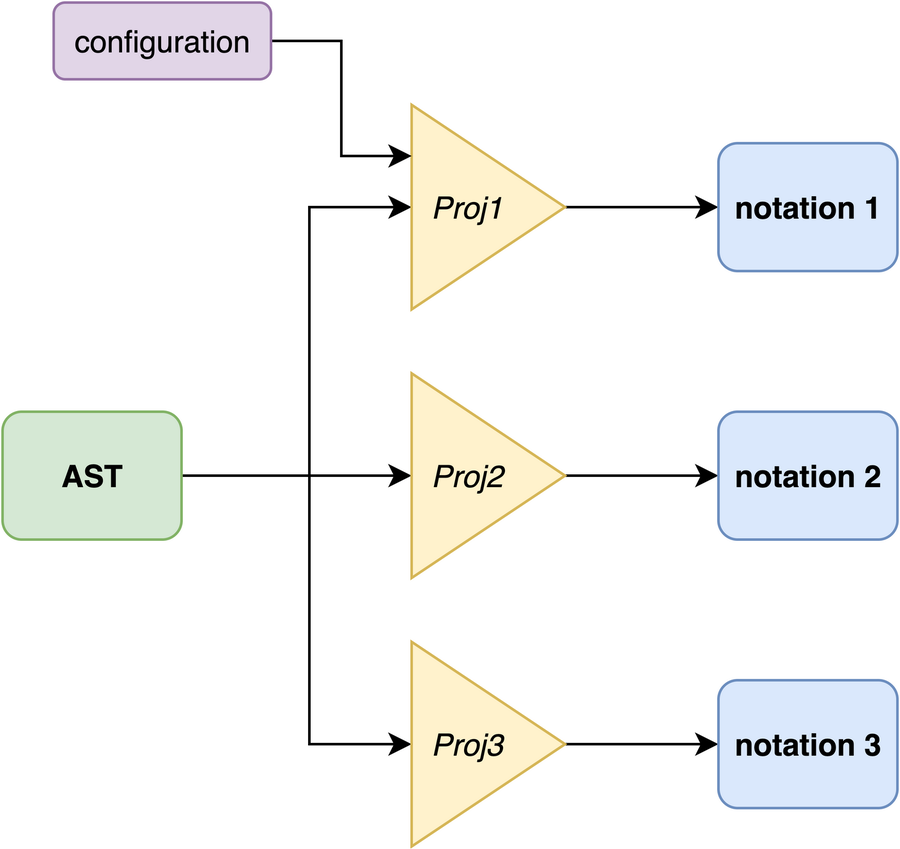
Multiple projections
For MyFPL, I’m going to render ASTs as HTML with a modicum of CSS styling. “Everyone” knows HTML (with CSS, allegedly…), *and* it gives a lot of freedom, including that of using SVG for graphical notations, if one would so desire.
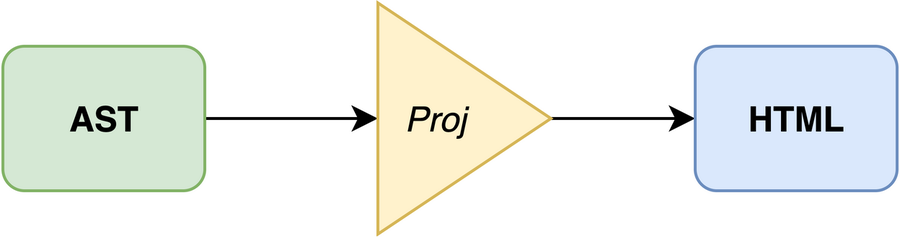
Projecting an AST to HTML
A projection can – in principle – be turned into an *editor*. For a plain text syntax, that would most likely mean *parsing* the rendered-and-then-modified text as an AST, comparing that with the original AST, and patching the original AST with changes inferred from that comparison. This is a very well-known but actually pretty cumbersome approach, with challenges such as having to come up with a(n unambiguous) grammar for the textual notation, resolving references from partially or fully-qualified names, and implementing an LSP server.
We can keep the architecture really simple by implementing a projection that renders the AST in a “rich” format such as HTML. Such as projection can relatively simply be extended to *trigger actions* that modify the AST in a precise way.

Extending a projection with editing capabilities
In my book\[1\], I use a combination of the [React](https://react.dev/?ref=dsl-consultancy.ghost.io) and [MobX](https://mobx.js.org/?ref=dsl-consultancy.ghost.io) frameworks to implement a projection and editor from scratch. For this blog series, I’ve decided to hold off on the editability part of the projection for a while. Adding editability to a projection requires quite a bit of work to get to a decent level of usability, which I think distracts from the overall goal of the blog series. This avoids having to implement any interaction, but has the downside we have to – for now – rely on crafting ASTs by hand to be able to show the projection works.
## Adding the `Program` concept
At this point, a program can only consist of just one value, which is a bit boring — even if the value is deeply nested. To remedy that, we add a `Program` concept holding any number of values. Diagrammatically:
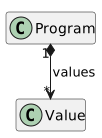
A program having(/holding) values
Add the following code to the `packages/build/src/structure.ts` file:
```
const Program = factory.concept("Program", ConceptModifier.concrete) (1)
factory.containment(Program, "values").ofType(Value).isMultiple().isOptional() (2)
```
**Definition of the* `Program` **concept (in the* `packages/build/src/structure.ts` **file)*
1. Construct a concept (as instance of LionWeb’s `Concept` type) named `Program`, that’s **concrete** — i.e., instantiable, and non-`abstract`. The concreteness is indicated using the `concrete` literal of the `ConceptModifier` enumeration — make sure to import that type.
2. Add a containment named `values` to the `Program` concept, of type `Value`, and cardinality 0..\* because it’s **multiple** and **optional**.
Run the `generate` task in `packages/build` to update the generated source code.
Now we can construct a program that consists of more than one value, as follows:
```
import { BinaryOperator } from "./MyFPL.g.js"
import { Shorthands } from "./shorthands.js"
const { binaryOperation, booleanShorthands, program } = new Shorthands() (1)
const { trueLiteral, falseLiteral, booleanType } = booleanShorthands
const myProgram = program() (2)
myProgram.addValues(binaryOperation(BinaryOperator.and, trueLiteral(), falseLiteral())) (3)
myProgram.addValues(binaryOperation(BinaryOperator.or, falseLiteral(), binaryOperation(BinaryOperator.and, trueLiteral(), trueLiteral())))
myProgram.addValues(booleanType())
```
**Construct an example program (in the* ****new** `packages/my-fpl/example.ts` **file)*
1. Also import the `program` shorthand — see the listing directly below.
2. Construct an instance of `Program`. We name the constant `myProgram`, because we’ve already destructured `program` from the `Shorthands` instance.
3. Add some values to the program.
```
program = (): Program => Program.create(newId())
```
**The implementation of the* `program` **shorthand, as a member of the* `Shorthands` **class (in the* `packages/my-fpl/shorthands.ts` **file)*
## Implementing the boilerplate
I like the JSX/TSX syntax to produce HTML. So, even though we won’t be using React to implement any interactions, I’ll use React to render an(y) AST as HTML. This sounds a lot like SSR – **S**erver-**S**ide **R**endering, which is essentially what I’ll be doing.
Before we can start implementing the actual projection function, we have to implement some boilerplate. To be able to use JSX/TSX syntax, we have to have the line `"jsx": "react",` present in the `compilerOptions` section of the `packages/my-fpl/tsconfig.json` file. Then, we can create the `packages/my-fpl/renderer.tsx` file, and give it the following contents:
```
import { readFileSync } from "node:fs" (1)
import React from "react" (2)
import { renderToString } from "react-dom/server"
import { Program } from "./MyFPL.g.js"
import { Projection } from "./projection.js"
const css = readFileSync("src/styling.css", { encoding: "utf8" }) (3)
export const rendered = (program: Program) => (4)
renderToString( (5)
MyFPL example
(6)
)
```
Implementation of the renderer (in the ****new** `packages/my-fpl/renderer.tsx` file)
1. Import from the Node.js API. For this to work, you have to execute `npm addd --save-dev @types/node` on the CLI, and then add the line `"types": ["node"]` to the `compilerOptions` section of the `packages/my-fpl/tsconfig.json` file.
2. Install the necessary NPM packages for this `import` statement to work. Do that by executing `npm add react`, `npm add react-dom`, and `npm add --save-dev @types/react-dom`.
3. Read the CSS file – see the second listing below – in as a string.
4. Define a `rendered` function that returns a rendering of a `Program` instance as HTML.
5. The call to this function does what it says on the tin: it renders the given JSX/TSX syntax directly as (plain text) HTML.
6. Include and activate the contents of the `packages/my-fpl/styling.css` file, by quoting the `css` string verbatim inside `